
How to Select from multiple tables in sql

 Select From Multiple Tables In SQL 


In this article, we are going to demonstrate how to select from multiple tables in SQL
 
SQL command in this statement is used to retrieve fields and records from multiple tables. we are need going to use a join query to get data from multiple tables. 

First, we are going to Create a Database and I named as sqlinner and change the master database to sqlinner database using the below commands.


Select from multiple tables in sql

create database sqlinner;


use sqlinner;


Let us we are taking three tables, two tables of brands named brand and brand price and the third table should be named as a stock table.

create table brand (brandId int  primary key identity(1,1) not null,name varchar(20) not null,
brand varchar(20) not null,Available varchar(20) not null);

select * from brand;


create table brandprice(brandId int primary key identity(1,1)not null,price varchar(20) not null);

select * from brandprice;


Insert data on brand Table


insert into brand (name,brand,Available)values('shirt','addias','yes');
insert into brand (name,brand,Available)values('shoes','woodland','yes');
insert into brand (name,brand,Available)values('shirt','woodland','No');
insert into brand (name,brand,Available)values('shoes','Bata','yes');
insert into brand (name,brand,Available)values('shirt','peter england','yes');
insert into brand (name,brand,Available)values('shirt','otto','yes');
insert into brand (name,brand,Available)values('shirt','weis','No');
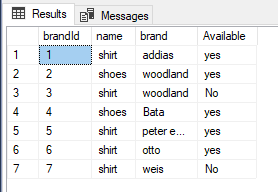

Select from multiple tables in sql


Insert data on BrandPrice Table

insert into brandprice(price)values(500);
insert into brandprice(price)values(1500);
insert into brandprice(price)values(200);
insert into brandprice(price)values(700);
insert into brandprice(price)values(200);
insert into brandprice(price)values(500);
insert into brandprice(price)values(2500);
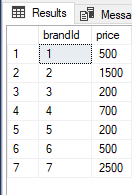

Select from multiple tables in sql

Here, we use left join to connect the two table brand table and brandprice table on both tables using primary key ID's


select brand.brandId , brand.name,brand.brand,brandprice.price from brand 
left join brandprice on 
brand.brandId=brandprice.brandId;


Select from multiple tables in sql


create table stock(brandId int identity(1,1) primary key,stock_no varchar(20) not null,
stock_bal varchar(20) not null);

select * from stock;


Insert Data on Stock Table


insert into stock(stock_no ,stock_bal)values(101,54);
insert into stock(stock_no ,stock_bal)values(354,2);
insert into stock(stock_no ,stock_bal)values(256,112);
insert into stock(stock_no ,stock_bal)values(87,10);
insert into stock(stock_no ,stock_bal)values(135,42);
insert into stock(stock_no ,stock_bal)values(856,22);
insert into stock(stock_no ,stock_bal)values(1023,17);


alter table stock add brand varchar(20);

update stock set brand = 'addias' where brandId=1;
update stock set brand = 'woodland' where brandId=2;
update stock set brand = 'bata' where brandId=3;
update stock set brand = 'peter england' where brandId=4;
update stock set brand = 'weis' where brandId=5;
update stock set brand = 'walkroo' where brandId=6;


alter table brandprice add stock_no varchar(20);

update brandprice set stock_no =101 where brandId=1;
update brandprice set stock_no =354 where brandId=2;
update brandprice set stock_no =256 where brandId=3;
update brandprice set stock_no =87 where brandId=4;
update brandprice set stock_no =135 where brandId=5;
update brandprice set stock_no =856 where brandId=6;
update brandprice set stock_no =1023 where brandId=7;
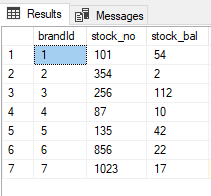

Select from multiple tables in sql

Here, we use Inner join to connect the two table brand table and brandprice table on both tables using primary key IDs and using where clause to which row having yes value to retrieve from "available" column.


select b.brandId,b.brand,b.name,bp.price from brand as b 
inner join brandprice as bp on 
b.brandId = bp.brandId where Available='yes' ;
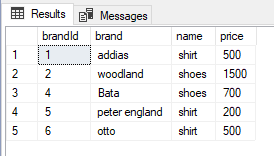

Select from multiple tables in sql

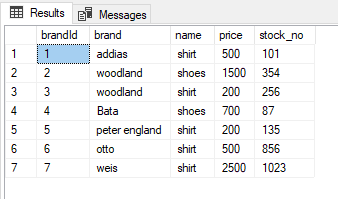
select b.brandId,b.brand,b.name,bp.price,s.stock_no from brand as b 
inner join brandprice as bp on 
b.brandId= bp.brandId 
inner join stock s on 
s.stock_no =bp.stock_no;

Select from multiple tables in sql

Comments

Popular posts from this blog

Contact Management System project using C with source code

Contact Management System (CMS)   A Contact Management System (CMS) is an essential application for organizing and managing contacts efficiently. Here's a simple implementation of a Contact Management System using C, allows users to perform operations such as adding, viewing, searching, modifying, and deleting contacts through a simple and user-friendly console interface. The CMS provides a practical demonstration of fundamental programming concepts such as arrays, structures, and string manipulation, making it an excellent project for students and beginners in C programming.   Project Overview The Contact Management System is designed to store basic information about contacts, including: Name: name of the person. Phone Number: phone number of the contact. Email Address: email address of the contact.   With this information, the program offers the following functionalities: Add New Contact...

Implementing Basic Add to Cart Functionality in Python Using Flask

In e-commerce websites, the "Add to Cart" feature allows users to select products they want to purchase and store them temporarily while they continue shopping. Implementing this functionality in a web application using Python and Flask is straightforward and can be done with a few simple steps.       Setting Up the Project: First, create a new directory for your project and set up a virtual environment to manage dependencies. Install Flask using pip and create three main files: `app.py`, `index.html`, and `cart.html`.   Read also:   Unlocking the Power of Free Google Tools for Seo Success Ultimate Guide: Google Search Console Crawl Reports you need to know Monitor What is dofollow backlinks: The ultimate 5 Benefit for your websites SEO Schema markup and How can you use schema markup for seo      Creating HTML Templates: Create HTML templates for displaying products (`index.html`) and the shopping cart (`cart.html`). These templates will use ...

Advanced HTML Concepts: Techniques and Examples for Modern Web Development

Advanced HTML goes beyond the basics of creating simple web pages, delving into powerful features and techniques that improve web interactivity, accessibility, and performance. It includes concepts such as semantic HTML, custom data attributes, responsive images with <picture> , enhanced forms, interactive content using <details> and <summary> , and embedding external resources with <iframe> .          Furthermore, advanced HTML focuses on SEO optimization through meta tags, accessibility improvements using ARIA, creating reusable Web Components, and optimizing performance with async and defer scripts.    Semantic HTML   Semantic elements clearly describe their meaning in a human- and machine-readable way.   <header> <h1>Welcome to My Website</h1> </header> <nav> <ul> <li><a href="home">Home...

Python Flask Student List CRUD System Using MySQL Database for Beginners

  In this tutorial, we are going to learn the python flask student list crud system using MySQL database for beginners. Before you have to learn how to python flask setting up and connect MySQL database connection and templates uses.    Read also: Python Flask tutorial Setting up a Flask and Sql Database on the create project folder you have to install two things to fetch data and flask. Here, below code to install using python terminal, and for MySQL, am using xampp software and database inside environment to turn on the apache server and MySQL database.   Read also: Python Flask with Mysql Database Import Flask and MySQL: from flask import Flask, render_template, request, redirect, url_for from flask_mysqldb import MySQL MySQL Database Connection: app = Flask(__name__) app.config['MYSQL_HOST'] = 'localhost' app.config['MYSQL_USER'] = 'root' app.config['MYSQL_PASSWORD'] = '' app.config['MYSQL_DB'] ...

Microdata Schema : How can Microdata schema Improve SEO with Examples

In this article, we will explore what microdata schema is, how it works, and provide some examples to help you better understand its importance. What is Microdata Schema? Microdata schema is a markup language that provides a standardized way of adding structured data to web pages. It uses HTML tags to describe information about the content on a web page, such as product reviews, events, recipes, and more. This makes it easier for search engines to crawl and index the content on a web page, which can help improve the visibility and ranking of the website. How Does Microdata Schema Work? Microdata schema uses a set of properties and item types to describe the content on a web page. Properties describe specific attributes of an item, while item types describe the type of item being described. For example, the property "name" might be used to describe the name of a person, while the item type "Person" would be used to indicate that the content being describ...

How to Create a Personal details information program in HTML

In this tutorial, we are learning how you can create a personal details information program in HTML with the simple using of HTML tags. HTML Form: <div class="container"> <h1 style="text-align:center">Personal Details</h1> <form class="form-control"> <label for="name">Name:</label><br> <input type="text" id="name" name="name"><br> <label for="email">Email:</label><br> <input type="email" id="email" name="email"><br> <label for="dob">Date of Birth:</label><br> <input type="date" id="dob" name="dob"><br> <label for="gender">Gender:</label><br> <input type="radio" id="gender" name="gender" value="male...